Mason for developers
Build and deploy functional client-side software in minutes

What is Mason?
Mason is a platform for creating browser-based user-interface software, inspired by componentization, RESTful APIs, data/presentation layer separation, and UI norms.
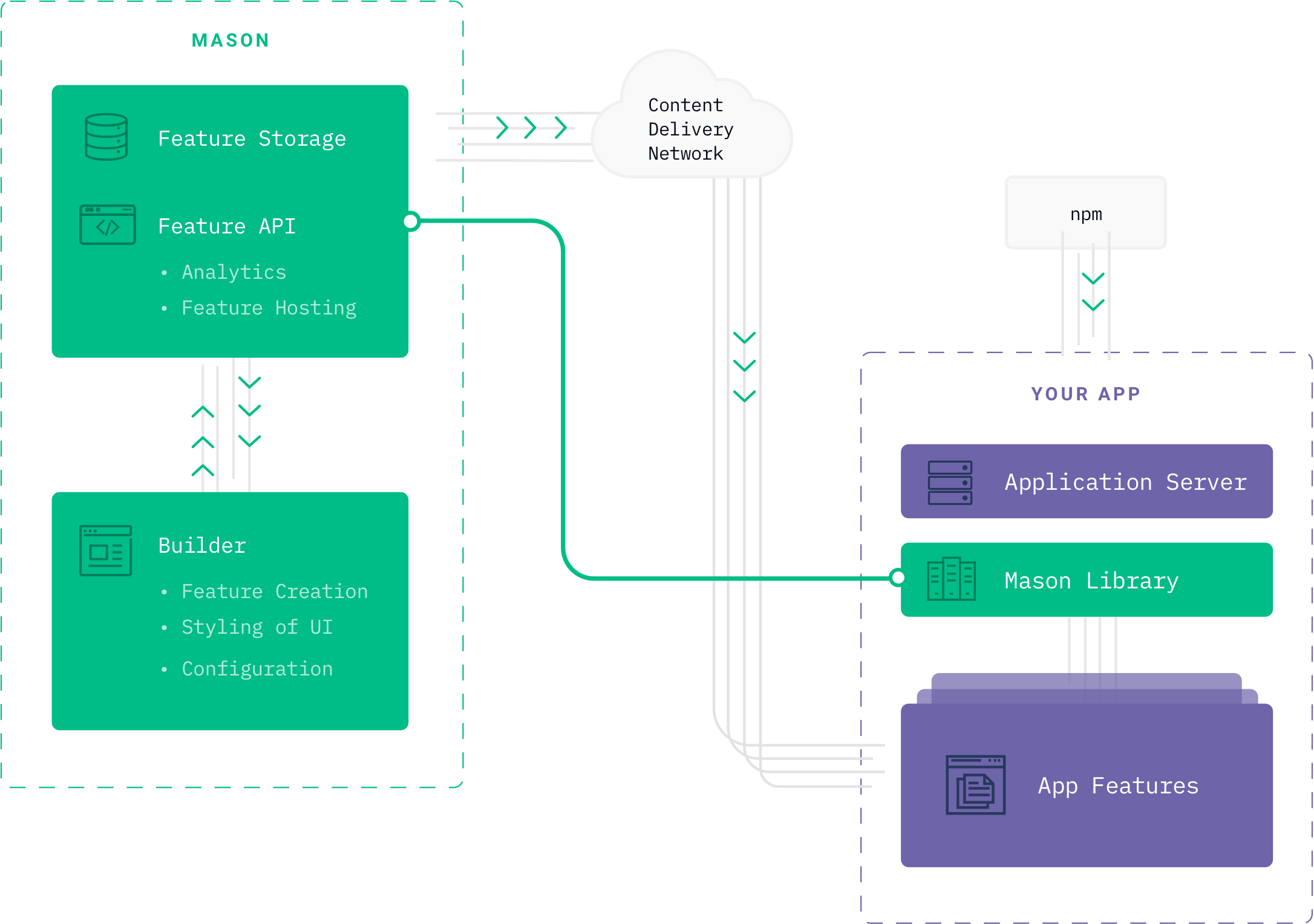
Mason provides software components as a service using React components and HTML5 custom elements. Mason components are given a unique identifier, which is deployed once to your application codebase. At runtime, the Mason library fetches your component configuration from our API and renders your implementation in your application.
Docs
Request a demo.
We believe the current state of affairs, where millions of developers hand-code extremely similar commodity UI software, test it, build and deploy it to a server, and maintain it forever, has had its day. Mason continues the decades long mission of software automation and abstraction and allows for an unprecedented level of code reuse and sharing.
Why use Mason?
Deploy less often—faster
After you deploy a component, you can modify and republish without redeploying. Build and deploy faster by reducing your codebase and test suite footprint. Rolling back is a simple as pressing Undo + Publish.
Write less code—better
Less code == less bugs. Mason components are simple and stress-tested. Don’t add to your codebase every time you need to implement new UI—keep it lean and focus on unique functionality only you can create.
Empower your team
Developers are often the bottleneck for application changes. Free up developer time and let any team member make non-technical changes. Change design, copy, or add interactive elements like forms or dynamic data—without touching your codebase.
Mason lets you create clean user interfaces
See the docsHuman-readable HTML/CSS
Use familiar HTML elements to create custom layouts, and generate legible HTML at runtime. Open up the inspector and view the source in your browser—no weird code generation. It looks like code written by hand.
Responsive breakpoints
Desktop, tablet, and mobile screen sizes are all supported. Universal mode lets you quickly make changes across all screen sizes.
Prefab elements
Mason provides prefabbed common UI elements like columns, dropdown menus, and tooltips—and we’re adding new elements all the time.
Mason is backend-agnostic
See the docsCollect data with forms
Drop in a Form element and configure your inputs. Mason forms submit asynchronously using the browser’s fetch API to send a JSON payload to any server. Data goes directly from your user’s device to your destination server—just like a form you coded.
Format/Inject data
Name your form inputs in the Builder, and your Mason form will send the data as a flat JSON object with matching keys by default. For custom data formatting, use the `willSendData` callback to format the payload to match the destination server’s expectations.
Dynamic URLs
Most RESTful APIs have a dynamic component to their requests, whether headers, query parameters, or embedded route parameters. With the `willSendData` callback, modify the HTTP endpoint, or inject header values and query parameters at runtime.
Mason lets you create clean user interfaces
On demand
Mason gives complete strategic control to you. Our builder exposes callbacks to let you inject custom logic for data handling between Mason and your backend.
Secure
It’s management you can trust. We never save user or company data, or host customer data. Mason uses HTTPS and token-based authentication for complete data security.
Custom
Anything built with Mason will look and feel exactly like your existing site or app, and you can add custom children to anything you build with Mason.
Maintenance-free
Mason solutions are functional and always up to date. All changes are continuously integrated.
Mason provides easy integration and extensibility
Try it out
React
Mason components are just React components. Embed them in your JSX to surround them with custom UI, or inject a React component into your Mason component using a custom element.

HTML 5
Not using React? No problem. Use the static mason.js library and your components will render using the HTML5 Custom Element API in any HTML file.

Exportable
Forget vendor lock-in. Mason components generate static CSS stylesheets and HTML you can copy and paste into your own codebase if you choose to manage your own code.

Third-party integrations
We provide codeless third-party integrations like Facebook Login, Twilio/Authy Two-Factor Authentication, and Okta Single Sign On. We’re expanding our library constantly to reduce the boilerplate code in your applications.